


Instagram Shops lets you combine your ecommerce platform with your social media strategy – which means you can focus on building one platform instead of two.
But how do you sell on Instagram or even set up a shop in the first place? Our guide explains it all – plus get the latest 2026 updates.
Instagram Shops: 2026 update
Instagram has phased out its native in‑app checkout option – which may have previously been available to you depending on your shop’s region. As of September 2025, you’ll need to have updated your checkout method to website checkout.
You can update your checkout method to a website by adding a checkout URL in the Commerce Manager section. Make sure you also update any copy that mentions you can buy without leaving Instagram directly.
What are Instagram’s shoppable posts?
The inability to add external links to posts has long been an issue for Instagram users, not least for small business owners trying to grow their customer base.
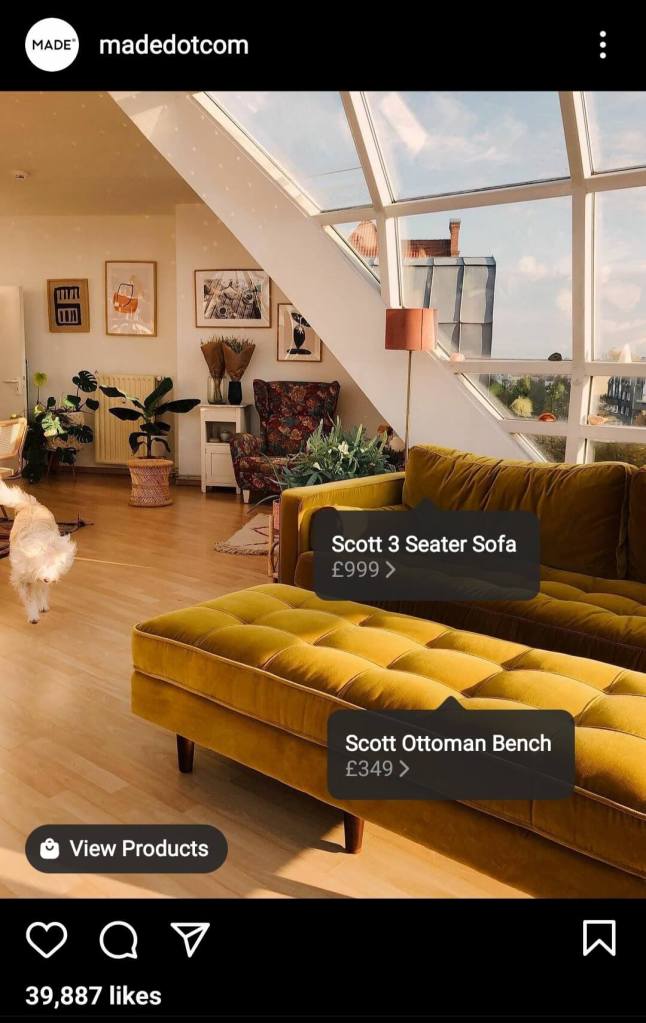
The good news is that the Instagram shoppable posts and checkout features now make it simple for customers to browse and buy products without ever leaving the app. There’s a bit of setting up to do, but once that’s organised, you simply need to tag your products in a post – just like you would tag a person.
To add shopping tags to your Instagram posts:
- Make sure you’re set up as a businesses, partner, or qualified public Instagram account
- Create a post as usual (tap the create button and select photos and videos)
- Tap ‘tag products’ and search for your chosen products
- Post – remember you can tag up to 20 products and shops in a photo feed post
Instagram selling: where should you start?
There are a few things you need to do to get your products live on the app and ready for sharing. Not sure where to start? Follow our step-by-step guide for selling on Instagram in the UK.
1. Find the right product
If you’re new to running an online shop and are wondering what products to sell, it’s a good idea to think creatively about what naturally lends itself to photography, and any current trends.
Products that work particularly well on Instagram include:
- clothing
- shoes
- food
- plants
- beauty products
- homeware
- sporting goods
If you’re still stuck for ideas, a phenomenon dubbed ‘the Netflix effect’ has seen certain products soar in popularity – including a surprising rise in demand for chess sets thanks to The Queen’s Gambit.
2. Set up your Instagram business account
You’ll need an Instagram business account to access these tools – this can easily be switched over in the settings of your personal account.
Be sure to make time to create a profile that clearly describes your business, products and ethos. You want it to reflect your brand, so include your logo and brand colours too.
3. Create your shop
Now this takes a bit of admin time as you need to catalogue and add all your products using Facebook Business Manager. Have a read of Facebook’s how-to guides for this:
Make sure you have a 500 by 500 pixel image, product description, price, SKU, and product link for each item.
Another way to set up your shop is to connect your Facebook business page with Shopify or BigCommerce.
Either way, there’ll be a short wait for Instagram to approve your product catalogue, then you can go ahead and connect it to your profile.
Once you’re all set up, you’ll see a handy Shop tab on your profile where customers can view all your products in one place.
Next, make sure you’ve turned on Instagram Shopping in your settings, by tapping:
- Business
- Shopping
- Connect your product catalogue
4. Photograph or video your products
You’re nearly ready to start sharing. But what makes a successful shoppable Instagram feed?
The bottom line is that people don’t want to feel like they’re being sold to – it’s a social media channel after all – so while your content needs to look professional, it also needs to feel authentic.
This can be a challenging balance, so here are some of our top tips:
- be genuine – try to avoid sharing photos that look staged and out of place on the feed
- use UGC (user generated content) – connect with your audience and show your products in real-life settings, which can help build trust in your brand
- feature your brand colours – if you’re using a backdrop in your pictures for example, be consistent with how you use colour and materials
- tell a story – this is your chance to be creative and have fun
5. Get tagging and sharing
It’s time to create your stories and posts with your beautifully photographed products. Use Instagram shoppable tags for each product as if you’re tagging a person.
Can you tell a story with your caption? Use key dates in your industry’s calendar to find a ‘hook’. And always include a call to action with what you want your customers to do.
To help with planning, you might want to use a social media management tool like Hootsuite so you can schedule posts ahead of time.
6. Start marketing
When it comes to marketing your Instagram shop, you might want to consider:
- micro-influencer partnerships – influencers can help promote your product and are seen as more genuine than other forms of advertising
- hashtags – look at your industry and use targeted hashtags to help reach your customers
- the best time to post – do your research on when your customers are online, and make sure you’re posting frequently
- offers and discounts – Instagram giveaways are a great way to encourage engagement and grow your business
While it’s free to sell on Instagram, if you have the budget, you could look into boosting sales with paid advertising. This means you can promote certain posts or stories and reach a wider network.
You’ll want to have a detailed marketing plan so you know what to budget for and whether your strategy is working. For more information, read our guide on advertising your small business.
7. Check any legal regulations
You must sell goods that comply with Instagram regulations – so make sure you read the merchant agreement and commerce policies.
Running your shop from home? You’ll need permission from your landlord if your home is rented. If you’re a homeowner then you may need to speak to your mortgage lender.
Not sure if Instagram is the platform for you? Read our guide to making money on Pinterest for more inspiration.
More useful guides for small business owners
- How to take payments online
- Do I need a PayPal business account for my small business?
- How to write a business plan
- A quick guide to selling on Amazon in the UK
Looking for self-employed insurance?
With Simply Business you can build a single self employed insurance policy combining the covers that are relevant to you. Whether it’s public liability insurance, professional indemnity or whatever else you need, we’ll run you a quick quote online, and let you decide if we’re a good fit.