

If you’re self-employed or a landlord, you might have heard that the way you do your taxes is changing – but new research reveals that 46 per cent of small business owners don’t feel prepared for the change.
Making Tax Digital for Income Tax Self Assessment (MTD for ITSA) is rolling out from April 2026 – and it’s bringing some big updates to how you keep records and file your returns.
But what does this actually mean for you? Will you still need to complete a Self Assessment tax return, or is MTD replacing it entirely? And what do you need to do to get ready?
From the key dates to what’s changing (and what’s staying the same), here’s everything you need to know.
What is Making Tax Digital for Income Tax Self Assessment?
Making Tax Digital for Income Tax Self Assessment (MTD for ITSA) is a new way of managing your tax records and reporting your income to HMRC. Instead of filling out one big Self Assessment tax return each year, you’ll use compatible software to keep digital records and send quarterly updates to HMRC throughout the tax year.
Are small business owners ready for Making Tax Digital?
Recent data suggests many small business owners still have concerns about the upcoming changes. According to Simply Business research, 46 per cent of small business owners don’t feel prepared for Making Tax Digital.
The main concerns include:

25%
Fear of making mistakes

20%
Not understanding how it works

14%
Potential penalties
If you’re feeling uncertain, you’re not alone. But the good news is that there’s still time to get ready, and there are plenty of resources available to help.
When does Making Tax Digital for Income Tax start?
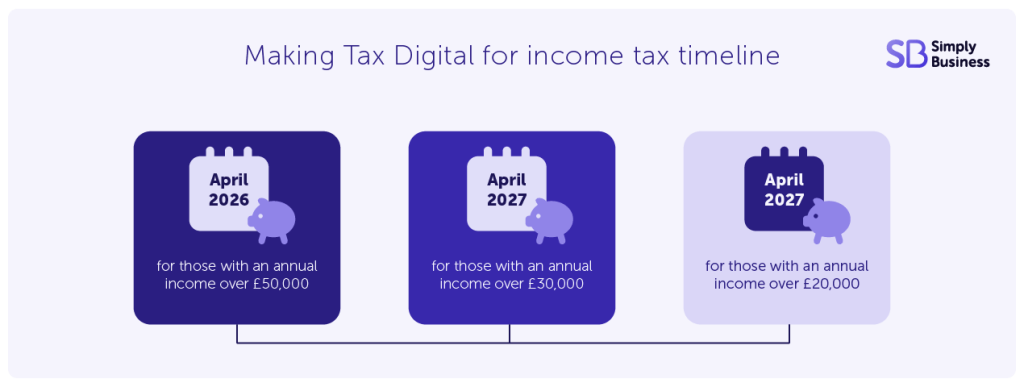
MTD for ITSA is rolling out in phases based on your total turnover. Here’s when you’ll need to start using it:
- 6 April 2026 if your turnover is above £50,000
- 6 April 2027 if your turnover is above £30,000
- 6 April 2028 if your turnover is above £20,000
HMRC will work out your start date based on your latest tax return. Your turnover is the total amount of money you bring in before you take off any expenses or pay tax (sometimes called gross income). Other types of income, like employment income or pensions, won’t count towards these thresholds.
If your turnover reaches one of these amounts, HMRC will contact you to confirm you need to get ready. You won’t be signed up automatically, so it’s important to sign up as soon as possible to meet your deadline.
What’s changing with Making Tax Digital?
Digital record-keeping
You’ll need to keep your records digitally using MTD-compatible software. This means no more shoebox full of receipts or handwritten ledgers (unless you’re digitising them). Your software will help you track income and expenses throughout the year.
Quarterly updates
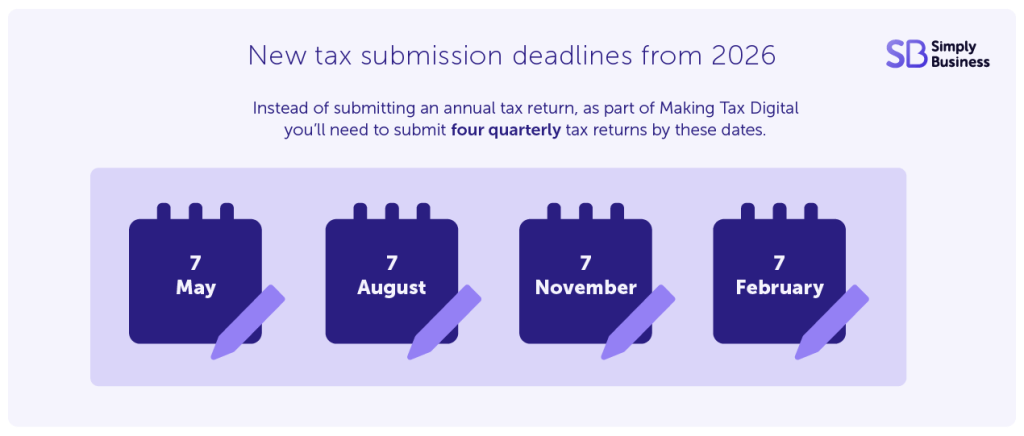
Instead of submitting one annual tax return, you’ll send HMRC quarterly updates about your income and expenses. You have the choice of two update periods depending on the accounting period you’ve chosen:
- standard update periods – aligning to the tax year (6 April to 5 April)
- calendar update periods – ending on the last day of the month
Regardless of the period you choose, these updates will be due roughly every three months:
- 7 August
- 7 November
- 7 February
- 7 May
If you earn money from both self-employment and property, you’ll need to keep separate records for each and send separate quarterly updates.
End-of-year tax return
After you’ve sent your four quarterly updates, you’ll still need to submit an end-of-year tax return (also called a Final Declaration). But here’s the good news: you’ll do this straight from your compatible software, and it should be much simpler because you’ve already reported most of your information throughout the year.
Points-based penalties
HMRC is introducing a fairer penalty system. If you miss a submission deadline, you’ll get a penalty point. Get too many points and you’ll pay a fine. The number of points you can receive depends on how many updates you’re expected to send each year.
Do I need to pay tax four times a year?
No, you do not need to pay tax four times a year under Making Tax Digital. While you’ll submit quarterly updates to HMRC about your income and expenses, the deadline for actually paying your tax bill stays the same – it’s once a year, by 31 January following the end of the tax year. The quarterly updates are for reporting purposes only and do not change how often you need to make payments.
What’s staying the same?
You’ll still file a Self Assessment tax return
MTD isn’t replacing Self Assessment completely. Self Assessment as a process still exists, as you’re still assessing your tax – just under a new digital process. Your annual tax return is then replaced by a ‘Final Declaration’.
And in your first year using the new service, you’ll still need to fill out a Self Assessment tax return for the previous tax year the usual way. That’s because you won’t have sent quarterly updates for that year yet.
You can sign in and submit your Self Assessment tax return through your HMRC online tax account. You’ll still need to do this by 31 January.
Payment deadlines
The deadline for paying your tax bill remains 31 January. MTD changes how you report your income, but not when you pay your tax. You’ll still only pay tax once a year.
Self Assessment Unique Taxpayer Reference (UTR)
You’ll still use your existing Self Assessment UTR to identify yourself to HMRC
Your Making Tax Digital checklist
Here’s what you need to do to prepare for Making Tax Digital before April 2026 (or your relevant start date):
1. Check if you need to use MTD
Work out your total turnover from self-employment and property income. If it’s above £50,000, you’ll need to start using MTD from 6 April 2026. If it’s between £30,000 and £50,000, you’ll start from 6 April 2027.
You can check if you’re eligible for Making Tax Digital on the government website.
2. Choose compatible software
You’ll need to use HMRC-recognised software to keep your digital records and send your quarterly updates. If you already use software to submit your Self Assessment tax return, check with your provider to make sure it will work with MTD. If not, you’ll need to find new software.
You can find compatible software on the government website.
3. Build your digital skills
If you’re not confident with technology, now’s the time to brush up on your digital skills. The National Careers Service offers free training that covers digital record-keeping and other useful skills.
Remember, you don’t have to learn everything at once. Take it at your own pace and focus on what you need to know to use your chosen software effectively.
4. Get your records in order
Start organising your financial records now so they’re ready to transfer to your new software. This includes:
- income from all sources
- business expenses
- receipts and invoices
- bank statements
- records of any assets you’ve bought or sold
Having everything in one place will make the transition much smoother.
5. Sign up for Making Tax Digital
Once you’ve chosen your software and you’re ready to go, you’ll need to sign up on the government website. HMRC will ask you some questions to check you’re good to go.
Don’t wait until the last minute to sign up. Give yourself plenty of time to get familiar with the new system before your first quarterly update is due.
6. Consider getting professional help
If you’re feeling overwhelmed, it might be worth speaking to an accountant or bookkeeper. They can help you choose the right software, set up your digital records, and make sure you’re submitting everything correctly.
Many accountants are already familiar with Making Tax Digital, so they can take a lot of the stress out of the transition.
FAQs for Making Tax Digital
Will I still need to do a Self Assessment tax return?
Yes, at least for the first year. In your first year using MTD, you’ll still need to fill out a Self Assessment tax return for the previous tax year. After that, you’ll be able to submit your end-of-year tax return straight from your compatible software.
What if I’ve only just started working for myself or renting out property?
You won’t need to use MTD right away. First, you’ll complete one Self Assessment tax return. Then HMRC will check your turnover and let you know when you need to sign up for Making Tax Digital.
Can I get an exemption from Making Tax Digital?
You can apply for an exemption if you think you’re digitally excluded. This means it’s not reasonable for you to use compatible software because of factors like your age, disability, health condition, location, or religious beliefs.
What happens if I miss a quarterly update?
If you miss a submission deadline, you’ll receive a penalty point under the new points-based system. Get too many points and you’ll have to pay a fine. The number of points depends on how many updates you’re expected to send each year.
In the first tax year (2026-27), the government has confirmed that there won’t be penalties for late submissions on quarterly updates – but there will be fines for late payment. This is a soft landing for the first year of introduction only.
Do limited companies need to use Making Tax Digital for Income Tax?
No, limited companies don’t need to use MTD for ITSA. However, if you’re VAT-registered, you may already be using Making Tax Digital for VAT.
What if I earn income from both self-employment and property?
You’ll need to keep separate digital records for each type of income and send separate quarterly updates. Then all your income will pull through into one end-of-year tax return.
How much will Making Tax Digital software cost?
Software costs vary. Some providers offer free versions with basic features, while others charge a monthly or annual fee. Shop around and compare different options to find one that fits your budget.
Get ready for Making Tax Digital today
Making Tax Digital might feel like a big change, but it doesn’t have to be overwhelming. By starting your preparation now, choosing the right software, and building your digital skills, you’ll be ready when your deadline arrives.
Remember, you’re not alone in this transition. HMRC has published lots of guidance on their website, and there are many software providers and accountants who can help you get set up.
The sooner you start preparing, the more confident you’ll feel when Making Tax Digital for Income Tax Self Assessment goes live. Don’t wait until the last minute – get ahead of the curve and make the transition as smooth as possible.
More tax guides for small business owners
- New tax laws for businesses in 2026 – and Self Assessment shake-up
- How long to keep tax records in the UK (2026 update)
- Small business tax relief – a guide to reduce your tax bill
- New financial year checklist: how to prepare for 2026-27
Ready to set up your cover?
As one of the UK’s biggest business insurance providers, we specialise in public liability insurance and protect more trades than anybody else. Why not take a look now and build a quick, tailored quote?